Looking for ways to play Roblox unblocked at school? Our complete 2026 guide compares 5 methods, explains how school blocks work, and lists crucial risks to know before you try.
Many schools block gaming platforms like Roblox to maintain a focused learning environment and manage network bandwidth. For students looking for a way to access it during breaks, this guide explains the technical details, common methods, and critical risks you should know.
Schools implement blocks on gaming websites for several valid reasons:
Understanding the blocking method helps in choosing a counter-strategy. School IT departments typically use a multi-layered approach:
Different methods target different layers of the school's network defense.
This method bypasses almost all technical blocks because you are not running the game on your school computer.
A proxy acts as a middleman between you and Roblox.
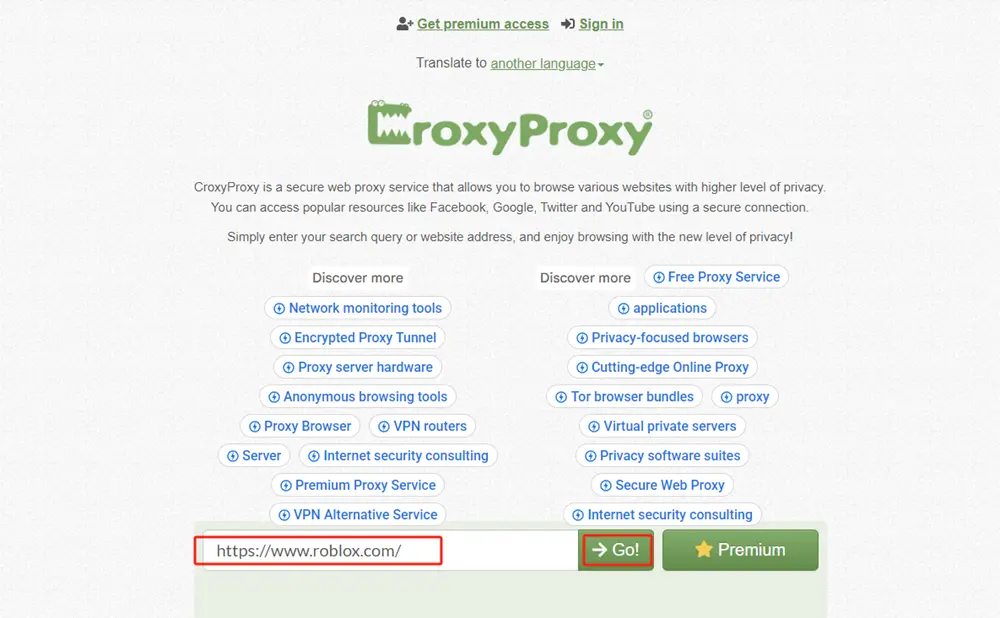
How it Works: You go to a free proxy website, such as croxyproxy.com, and enter the Roblox URL:https://www.roblox.com in the web page search bar, and the site fetches it for you. The school firewall only sees a connection to the proxy's address, not to Roblox.
Pros: Quick, easy, and requires no setup.
Cons: Extremely insecure. These sites are often filled with malicious ads and can steal your login credentials. They are also very slow and are the first sites a school IT department blocks.
A VPN (Virtual Private Network) encrypts and reroutes all your internet traffic.
This method avoids the school's network completely.
This is a sophisticated tool designed for privacy and bypassing advanced detection.
| Method & Target Layer | How It Technically Works | The Technical "Cat and Mouse" Game |
|---|---|---|
| Web Proxy (Layer 1 & 2) | Acts as a middleman. Your PC sends a request to the proxy server, which fetches Roblox.com and sends it back. This masks the final destination from the school firewall. | Schools' Countermove: Maintain and auto-update blocklists of known public proxy IP addresses. Use SSL inspection to see the domain inside encrypted traffic. |
| VPN (Layer 1, 2, 3, & 4) | Creates an encrypted tunnel from your device to a VPN server. All your traffic exits from that server. The school only sees encrypted data to the VPN IP. | Schools' Countermove: Block IP ranges of major commercial VPN providers. Use traffic analysis to detect patterns consistent with VPN/Proxy use (e.g., sustained encrypted traffic). |
| Cloud Gaming (Bypasses All) | This is the most elegant bypass. You are not running Roblox locally. You are streaming a video feed of a game running on a remote server. To the school network, it looks like you are watching a video (e.g., from Google Stadia, now.gg). | Schools' Countermove: Cloud gaming services have unique domains. If they become popular for bypassing blocks, these specific domains (like "now.gg") can be added to the blocklist. |
| Anti-Fingerprint Browser (Layer 5) | The most sophisticated user-side tool. It doesn't just change your IP; it spoofs your browser's digital fingerprint. It presents a randomized, controlled set of browser characteristics (canvas hash, WebGL vendor, etc.) that appears as a unique, "clean" device, evading fingerprint-based blocking rules. | Schools' Countermove: Very difficult. Requires implementing advanced, active fingerprinting systems and heuristic analysis to detect anomalies in spoofed fingerprints, which is rare in most school environments. |
** IMPORTANT**: Attempting to bypass school network security carries real consequences.
If you choose to proceed, follow these safety tips:
The most reliable and lowest-risk method for most students is using a cloud gaming platform on a personal device connected to a mobile hotspot. This requires no software installation on school property and avoids the school's network entirely.
However, the safest and most recommended path is to respect your school's rules. Use school time for learning and save Roblox for when you are at home on your own device and network. The potential consequences of getting caught are simply not worth the brief gameplay.
A1: While network restrictions typically prevent downloading Roblox on a school computer, you can often access it through web-based workarounds. These include streaming the game via cloud platforms like now.gg, using a web proxy, or connecting through a VPN—though VPNs themselves are commonly blocked. For the best chance, focus on browser-only solutions.
A2: Schools primarily block Roblox to minimize distractions during academic time, manage limited network bandwidth (so educational tools aren't slowed down), and fulfill their duty to filter inappropriate content and monitor online interactions for student safety.
A3: The method with the lowest technical risk is using a cloud gaming platform (like Now.gg) on a personal device connected to a mobile hotspot. This works because you're only streaming video (bypassing network blocks) and not using the school's network or installing software on their devices.
A4: A free web proxy acts as a middleman; you visit the proxy site and enter the Roblox URL, so the school firewall only sees a connection to the proxy. However, these sites are extremely insecure, often filled with malicious ads, and are a common vector for stealing login credentials and infecting devices with malware.
A5: Yes, schools can often detect VPN usage. While VPNs encrypt traffic, school IT departments can block the known IP address ranges of major VPN providers and use traffic analysis to detect patterns consistent with VPN use. Additionally, installing a VPN client may require admin rights or violate policy.
A6: Consequences can include academic discipline under your school's Acceptable Use Policy (AUP), such as loss of computer privileges, detention, or suspension. There are also significant security risks (malware, account theft) and privacy risks (data logging) from using unverified tools.
A7: Always use a strong, unique password and enable 2-Step Verification (2FA) in your account settings. Never share personal information online, and if you use any tool, opt for a reputable, paid service over a free one. Always log out and clear browser history/cache on shared school computers.


