Struggling with a blocked YouTube at school, work, or abroad? Our guide reveals 10 proven methods to unblock YouTube. Learn how to use proxies, mobile hotspots, and simple tricks to bypass restrictions and watch your videos securely. Find the best solution for you today!
YouTube might be the go-to platform for entertainment, tutorials, and music videos—but in many places, it’s locked behind digital doors. Whether you're stuck behind school firewalls, workplace filters, or even government censorship, you don’t have to give up your favorite content.
Luckily, there’s a simple fix: use a proxy. In this guide, we’ll walk you through everything you need to know about unblocking YouTube with proxies—step-by-step.

Before we unlock the solutions, let’s talk about why these restrictions exist in the first place.
Certain countries (like China, Iran, or North Korea) block access to YouTube entirely for political or cultural reasons. These blocks are enforced at the national level and can’t be bypassed without tools like proxies or VPNs.
Educational institutions (such as schools) and corporate offices often block YouTube to minimize distractions and manage network traffic. Public Wi-Fi hotspots like cafes or airports might do the same.
Even if you can access YouTube, some videos may be off-limits due to licensing. Think music videos, sports replays, or movie trailers—“This video is not available in your country” is a common headache.
Struggling to watch YouTube because it’s blocked at school, work, or while traveling? You’re not alone. Network restrictions can be frustrating when you need a tutorial, music, or a quick break. The good news is that bypassing these blocks is often easier than you think. From simple browser tricks to more secure tools, there are multiple effective methods to regain access. This guide breaks down the top 10 proven ways to unblock YouTube, helping you find the perfect solution to stream your favorite content anywhere, anytime. Let’s dive in.
This method completely avoids the restricted network (e.g., school or work Wi-Fi) by using your phone's cellular data connection.
How It Works: You enable the "Personal Hotspot" or "Tethering" feature on your smartphone. Your computer or other device then connects to the internet through your phone's 4G/5G connection, which operates on a separate network managed by your mobile carrier. Since this network is independent, it isn't subject to the same blocks as the local Wi-Fi.
Pros:
Extremely Simple: No software to install or complex settings to configure.
Highly Effective: It bypasses network-level filters and firewalls entirely, as you are no longer using the restricted network.
Cons:
Data Consumption: Streaming video consumes a large amount of data. This can quickly deplete your monthly data allowance, leading to slow speeds or extra charges.
Variable Speed & Signal: The quality of the connection depends on your cellular signal strength. In areas with poor reception, videos may buffer frequently.
Device Dependency: You need a smartphone with a sufficient data plan and tethering capabilities.
These are lightweight add-ons for browsers like Chrome or Firefox that often function as built-in proxy servers.
How It Works: You install an extension (e.g., "Proxy SwitchyOmega" or a dedicated "unblocker" extension). When activated, it reroutes your browser's traffic for specific sites (like YouTube) through a remote server, hiding your real IP address from the blocker.
Pros:
User-Friendly: One-click activation directly within your browser.
No System-Wide Changes: Unlike a VPN, it typically only affects your browser traffic, leaving other applications untouched.
Cons:
Security Risks: Free proxy extensions can be risky. Some may inject ads, track your browsing habits, or even contain malware. It's crucial to use extensions from reputable developers.
Unreliable: These services can be slow, get overloaded with users, or be detected and blocked by network administrators.
Browser-Based: The unblocking only works within the browser where the extension is installed.
The Tor Browser is designed for maximum privacy and anonymity by routing your traffic through a global, volunteer-run network of servers.
How It Works: Your connection is encrypted and bounced through at least three different, randomly selected servers ("nodes") around the world. This makes it extremely difficult for anyone to track your location or see what you're accessing.
Pros:
Extremely Private: Very effective at hiding your identity and location.
Free and Powerful: Can bypass sophisticated censorship and tracking.
Cons:
Very Slow: The multi-layered encryption and routing process introduces significant latency, making it often unsuitable for smooth video streaming.
Can Be Flagged: Some websites, including YouTube, may present extra CAPTCHAs or security checks because Tor's exit nodes are often associated with suspicious activity.
This method tackles blocks that are implemented through DNS (Domain Name System) poisoning.
How It Works: When you type "youtube.com," your device asks a DNS server for its numerical IP address. A restrictive network (like a school's) uses its own DNS to give a false address that leads to a "blocked" page. By switching to a public DNS like Google DNS (8.8.8.8, 8.8.4.4) or Cloudflare DNS (1.1.1.1), you bypass the manipulative server and get the correct IP address for YouTube.
Pros:
Fast & Lightweight: Once set up, it has minimal impact on your internet speed.
System-Wide: The change applies to your entire device's internet connection.
Cons:
Limited Effectiveness: Only works against DNS-based blocks. It will not bypass more advanced firewalls that block YouTube's IP addresses directly.
Technical Setup: Requires changing network adapter settings on your computer, which can be intimidating for non-technical users.
This is a technical trick that manipulates the website's code directly in the browser.
How It Works: Some web-based blockers work by loading a blocking script or overlay on the page. By pressing F12 to open Developer Tools, an advanced user can locate and delete or disable the HTML/CSS/JavaScript element that creates the "blocked" message, revealing the video player underneath.
Pros:
No External Tools Needed: Uses built-in browser features.
Instantaneous: Can work immediately if the block is client-side.
Cons:
Highly Technical: Requires knowledge of HTML and CSS to identify the correct elements.
Temporary & Fragile: The block will reappear as soon as you refresh the page. It's a "hack," not a permanent solution.
This method cleverly repurposes Google Translate as a web proxy.
How It Works: You go to Google Translate, paste the YouTube URL into the left-hand text box, and set the translation to a language different from the video's original (e.g., English to Spanish). Clicking the translated link on the right loads YouTube through Google's servers. The network filter sees you are visiting translate.google.com, not youtube.com.

Pros:
Extremely Simple and Creative: No installation or setup required.
Uses a Trusted Domain: Google.com is rarely blocked.
Cons:
Poor User Experience: The YouTube interface appears within the Google Translate frame, often with a messy layout, broken buttons, and poor video quality.
Unreliable: It may not work for all types of blocks and is not suitable for logging into your account or watching videos seamlessly.
This method hides the YouTube address behind a shortened link.
How It Works: You take a YouTube video URL (e.g., youtube.com/watch?v=...) and use a service like Bitly, TinyURL, or a custom URL shortener to create a new, condensed link (e.g., bit.ly/3xyz). The network filter may only have a list of known "bad" URLs, like youtube.com, and not recognize the shortened link.
Pros:
Quick and Easy: Takes seconds to create.
Cons:
Easily Defeated: Sophisticated filters can analyze the destination of the shortened link in real-time and block it anyway. It's a very short-term and fragile solution.
These are websites that act as intermediaries, fetching and displaying the YouTube video on their own page.
How It Works: You go to a site like "ssyoutube.com" or "hooktube.com," paste the YouTube video URL into their search bar, and the site pulls the video content and displays it on its own domain. The blocker only sees you visiting the unblocker site.
Pros:
No Installation: Web-based and convenient for a one-off video.
Cons:
Major Security Risks: These sites are often ad-heavy and may host malicious ads (malware). You have no control over what they do with the data you input.
Unreliable and Slow: They can be taken down, block themselves, or offer poor streaming performance.
Limited Functionality: You typically cannot log in, comment, or access your subscriptions and playlists.
These are websites that act as a browsing tunnel. You go to the proxy site, enter YouTube’s URL, and boom—you’re watching videos again.
Open a free proxy website like CroxyProxy.
Type https://www.youtube.com into the URL field.

Hit Enter and wait for the proxy to load YouTube.
Start watching travel vlog videos directly in your browser through CroxyProxy.

Pro tip: If one proxy doesn’t work, try another. You may also need to clear cookies or switch browsers.
The Method: A proxy server, like MoMoProxy, acts as a middleman, forwarding your requests to YouTube. Anti-detect browsers like AdsPower take this further by allowing you to create isolated browser profiles with unique digital fingerprints, which can be paired with proxy servers.
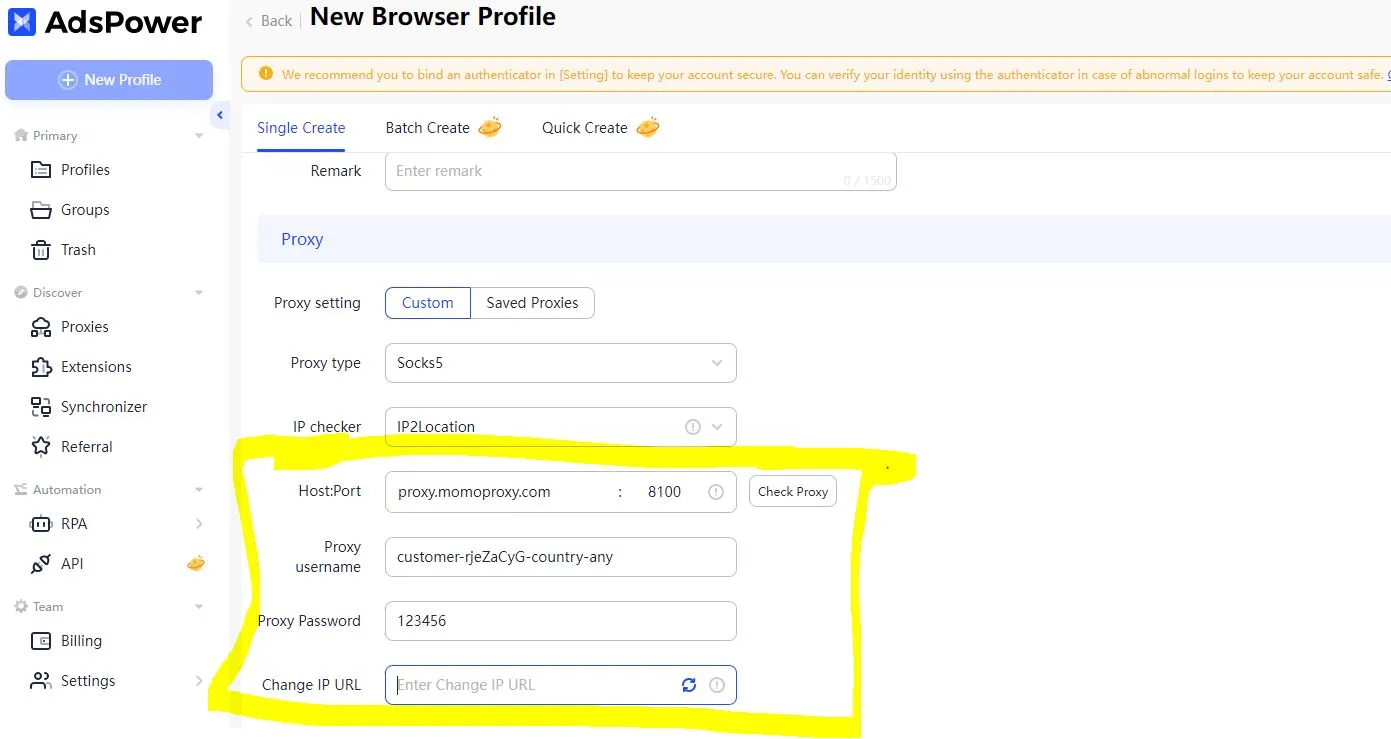
Best For: Users who need to manage multiple YouTube accounts or tasks simultaneously without getting flagged.
Pros:
Proxies are often freely available.
Anti-detect browsers offer superior management for multiple accounts and enhance anonymity.
Cons:
Standard proxies lack encryption and can be insecure.
Free proxies can be slow, unreliable, and may log your data.
For more details please read: How to Integrate MoMoProxy with Antidetect Browser
Always be mindful of the rules and terms of service for the network you are using. While unblocking YouTube is often harmless, it's important to respect institutional policies and focus on your primary responsibilities. For tasks involving multiple accounts or sensitive data, always prioritize security by choosing reputable tools over risky free alternatives.
Don't let digital barriers stop you from accessing the content you need. With this guide, you’re equipped to find the right key and unblock YouTube, wherever you are.
A1: YouTube can be blocked for several reasons: government censorship (e.g., in China, Iran, or North Korea), network restrictions at schools or offices to minimize distractions, or geo-blocking due to licensing agreements for certain videos.
A2: Using your smartphone’s mobile hotspot is the easiest method. By tethering your computer to your phone’s cellular data, you bypass the restricted Wi-Fi network entirely. However, be mindful of data usage, as streaming video can quickly consume your plan.
A3: Yes, extensions like Proxy SwitchyOmega can reroute your traffic through a remote server. They’re user-friendly and work with one click. However, free proxy extensions may pose security risks (ads, tracking, malware) and can sometimes be unreliable or blocked by network administrators.
A4: Not really. While Tor provides excellent privacy and can bypass censorship, it is very slow due to multi-layer encryption. This makes it unsuitable for smooth video streaming, and YouTube may also show extra CAPTCHAs or security checks when using Tor.
A5: You paste a YouTube URL into Google Translate, set a translation (e.g., English to Spanish), and click the translated link. This loads YouTube through Google’s servers, so the network filter sees translate.google.com instead of youtube.com. It works but offers a messy interface and poor video quality.
A6: Free web proxies require no downloads and work on most devices, but they come with trade-offs: slower speeds, potential downtime, basic security (not ideal for sensitive use), and often no HD/4K streaming. Use them only for casual, one-off viewing.
A7: No. Switching to a public DNS (like Google DNS 8.8.8.8 or Cloudflare 1.1.1.1) only bypasses DNS-based blocks. If a more advanced firewall blocks YouTube’s actual IP addresses, changing DNS won’t help.
A8: Always respect the rules and policies of the network you’re using (e.g., school or workplace guidelines). For tasks involving multiple accounts or sensitive data, prioritize security by choosing reputable paid proxies or VPNs over risky free alternatives.
A9: All the ways to watch YouTube unblocked as follows:
Related Articles:


